Category Archives: Programming Language
ASP.NET Core中如何配置Kestrel Urls呢,大家可能都知道使用UseUrls() 方法来配置。
今天给介绍全面的ASP.NET Core 配置 Urls,使用多种方式配置Urls。 让你了解ASP.NET Core Kestrel 的地址设置。 下面我们就来了解如何配置。我将介绍4种方式来配置Urls。 1、UseUrls方法 大家最熟悉的一种也就是使用UseUrls 。下面我们就来实际使用。 UseUrls 方法可以使用多个地址,也可以使用一个地址。 单个网址 UseUrls("http://localhost:5001") 多个网址 UseUrls("http://localhost:5001", "http://localhost:5002", "http://*:5003") //多个地址 *代表绑定所有本机地址 可以局域网访问,拥有外网ip 就可以外网访问 2、配置文件 下面使用配置文件来设置网址。 1).首先在项目中添加一个ASP.NET 配置文件hosting.json,在配置文件中加入server.urls 节点。 { "server.urls": "http://localhost:5001;http://localhost:5002;http://*:5003"} 2).这里首先需要添加两个引用 "Microsoft.Extensions.Configuration.FileExtensions": "1.0.0" "Microsoft.Extensions.Configuration.Json": "1.0.0" 3).Main方法添加配置 1 2 3 4 5 6 7 8 9 10 11 12 13 14 15 16 17 18 19 public static void Main(string[] args) { var config = new ConfigurationBuilder() .SetBasePath(Directory.GetCurrentDirectory()) // 这里添加配置文件 .AddJsonFile(Path.Combine("config", "hosting.json"), true) .Build(); var host = new WebHostBuilder() .UseKestrel() // 添加配置 .UseConfiguration(config) .UseContentRoot(Directory.GetCurrentDirectory()) .UseIISIntegration() .UseStartup<Startup>() .Build(); host.Run(); } 4).最后别忘了在project.json中添加输出配置,直接把整个config目录放进去了 1 2 3 4 5 6 7 8 […]
View Details.Net Core 2.2 项目部署到IIS
1、安装IIS所需的Host扩展 从官网(https://dotnet.microsoft.com/download/dotnet-core/2.2)下载对应的.net core版本的Runtime 里面有一个Runtime & Hosting Bundle,是IIS需要的模块扩展,用来处理Core相关的请求。 下载举例:https://dotnet.microsoft.com/download/thank-you/dotnet-runtime-2.2.5-windows-hosting-bundle-installer 2、安装模块拓展,并且查看IIS模块列表是否生效 注意,.Net Core 2.0之后的模块名叫AspNetCoreModuleV2,之前的模块名叫AspNetCoreModule,可以共存。 3、导出您的.Net Core项目到本地某文件夹位置。 3.1 主项目右键,点击“发布”。 3.2 发布目标,选“文件夹”,选择你想要的本地目录,用来存放这个Site所有的文件。 3.3 点击“发布”,成功生成项目发布文件。 这里注意处理下数据库,比如你的Sqllite数据库,是否已经完成复制过去,记得单独检查一下。 4、IIS中添加对应的网站,相关端口、IP可根据需要配置,或保持默认即可。 网站物理路径,选择刚才导出发布所在文件夹即可。 5、浏览网站即可访问。 如果出现500之类的错误,一方面检查之前的模块是否安装到位,一方面检查下数据库等文件和配置是否配置正确即可。 6、部分网络教程会提示,要把应用程序池改成未托管,不过经过实践,2.2版本不需要配置也可以正常运行,如果想配置的,找到Site对应的应用程序池,改成无托管代码即可。 from:https://www.cnblogs.com/craigtaylor/p/11143484.html
View Detailsasp.net+mysql解决Incorrect string value: '\xF0\x9F\x98\xAD
ALTER DATABASE 数据库 CHARACTER SET utf8mb4 COLLATE utf8mb4_general_ci; ALTER TABLE 表 CONVERT TO CHARACTER SET utf8mb4 COLLATE utf8mb4_general_ci; 数据库连接字符串加上:charset=utf8mb4
View Details解决mysql报错误 0x80004005 Incorrect string value: '\xF0\xA0\x83\x8A2\xE4…' for column
最近遇到一个mysql生产问题,一直报:报错误 0x80004005 Incorrect string value: '\xF0\xA0\x83\x8A2\xE4…' for column 经过排查原来数据库和表都是默认utf8编码,老司机都知道,mysql中的utf8编码有一个大坑,不是真正的utf8。当遇到特殊字符就会插入失败报下面的错误: MySql.Data.MySqlClient.MySqlException (0x80004005): Incorrect string value: '\xF0\xA0\x83\x8A2\xE4…' for column 使用环境: 1、asp.net core 2.2 2、dapper 3、mysql8 通过下面步骤完美解决: 一、首先查看当前数据库编码 1 show variables like 'character%' 最后必须要达到下面的设置: 二、更改数据库编码 1 ALTER DATABASE 数据库名称 DEFAULT CHARACTER SET utf8mb4 COLLATE utf8mb4_general_ci; 三、更改所有表和列编码 先生成所有表的更改语句,这样可以批量mysql所有表和列编码为utf8mb4 1 2 3 4 5 6 7 8 9 10 SELECT CONCAT( 'ALTER TABLE ', TABLE_NAME, ' CONVERT TO CHARACTER SET utf8mb4 COLLATE utf8mb4_general_ci;' ) FROM information_schema.TABLES WHERE TABLE_SCHEMA =’数据库名称'; 把上面查询结果导出,执行就行了。 四、更改数据库配置 数据库配置my.ini或my.cnf,你的配置可能不叫这个句子。 修改为如下配置: 1 2 3 4 5 6 7 [client] default-character-set=utf8mb4 [mysql] default-character-set=utf8mb4 [mysqld] collation-server = utf8mb4_general_ci character-set-server = utf8mb4 更改之后重启mysql 五、修改数据库连接 经过上面4步骤,以为就万事大吉了。 注意:一定要修改程序的数据库连接,不然照样报错。 如下: 1 Host=localhost;Port=3306;Database=lanhu;Uid=www.lanhusoft.com;pwd=lanhusoft;Charset=utf8mb4; 之前我们写成utf8都不行,一定要写成utf8mb4 from:https://lesg.cn/Article-53016.html
View DetailsIEnumerable和IQueryable区分
LINQ查询方法一共提供了两种扩展方法,在System.Linq命名空间下,有两个静态类:Enumerable类,它针对继承了IEnumerable<T>接口的集合进行扩展;Queryable类,针对继承了IQueryable<T>接口的集合进行扩展。我们会发现接口IQueryable<T>实际也是继承了IEnumerable<T>接口的,既然这样微软为什么要设计出两套扩展方法呢? 从LINQ查询功能上我们知道实际上可以分为三类:LINQ to OBJECTS、LINQ to SQL和LINQ to XML。其实微设计这两套接口主要是针对LINQ to OBJECTS和LINQ to SQL,两者对于查询的内部处理机制是完全不同的。针对LINQ to OBJECTS 时,使用Enumerable中的扩展方法对本地集合进行排序和查询操作,查询参数接受的是Func<>,Func<>叫做谓语表达式,相当于一个委托。针对LINQ to SQL时,则使用Queryable中的扩展方法,它接受的是Expression<>。 那么,到底什么时候使用IQueryable<T>,什么时候使用IEnumerable<T>? 首先我们来看一下LINQ to SQL的代码: using (var context = new NorthwindEntities()) { var orderTmp = context.Orders.Where(p=>p.CustomerID=="RATTC"); var orders = orderTmp.Where(p => p.OrderDate > new DateTime(1997, 1, 1)); foreach (var order in orders) { Console.WriteLine("OrderId:" + order.OrderID); } } 通过vs的Intellisense我们可以看到Where的返回类型为IQueryable,参数是Expression类型的: 我们再看一下这一段代码: using (var context = new NorthwindEntities()) { var orderTmp = context.Orders.Where(p => p.CustomerID == "RATTC").AsEnumerable(); var orders = orderTmp.Where(p => p.OrderDate > new DateTime(1997, 1, 1)); foreach (var order in orders) { Console.WriteLine("OrderId:" + order.OrderID); } } 这段代码的不同在于我们将LINQ的查询返回IEnumerable类型,我们看一下vs的Intellisense效果: 由于我们在LINQ查询的时候加上了AsEnumerable(),因此我们在第二条语句能看到返回类型已经变为IEnumerable,参数也变成了Func<>类型。 至于这两段代码到底有什么区别,我们分别执行代码,在sql profiler里看一下生成的sql语句: 第一段代码效果: 虽然我们使用两条语句进行了查询,但最终只生成了一条SQL语句,将查询参数合并了。 第二代码效果: 这一次我们依然只看到一条SQL语句,但查询条件也只有一个,但两次查询的结果是一致。 原因在于Func<>直接会被编译器编译成IL代码,但是Expression<>只是存储了一个表达式树,在运行期作处理,LINQ to SQL最终会将表达式树转为相应的SQL语句,然后在数据库中执行。 现在我们应该知道何时使用IEnumerable<T>,何时使用Iqueryable<T>。 from:https://www.cnblogs.com/zgqys1980/p/4047315.html
View DetailsC#定义泛型方法错误-类型“T”必须是引用类型才能用作泛型类型或方法“System.Data.Linq.Table”中的参数“TEntity”
错误写法:
|
1 2 3 4 |
public void GetTableElements<T>() { Table<T> UserTable = m_DataContext.GetTable<T>(); } |
解决方法: 在()后面加上where T : class即可,表示为泛型T为类型才能进行转换
|
1 2 3 4 |
public void GetTableElements<T>() where T : class { Table<T> UserTable = m_DataContext.GetTable<T>(); } |
from:https://blog.csdn.net/lujiachun1/article/details/77941859
View DetailsEF实现分页查询+条件查询+排序
先来看看几个LINQ to SQL的几个函数。 Take 说明:获取集合的前n个元素;延迟。即只返回限定数量的结果集。 var q = ( from e in db.Employees orderby e.HireDate select e) .Take(5); 语句描述:选择所雇用的前5个雇员。 Skip 说明:跳过集合的前n个元素;延迟。即我们跳过给定的数目返回后面的结果集。 var q = ( from p in db.Products orderby p.UnitPrice descending select p) .Skip (10); 语句描述:选择10种最贵产品之外的所有产品。 OrderBy 适用场景:对查询出的语句进行排序,比如按时间排序 等等。 说明:按指定表达式对集合排序;延迟,:按指定表达式对集合 排序;延迟,默认是升序,加上descending表示降序,对应的扩展方法是 OrderBy和OrderByDescending 下面这个例子使用 orderby 按雇用日期对雇员进行排序: var q = from e in db.Employees orderby e.HireDate select e; 说明:默认为升序 看完这两个函数的使用方法,那么分页的思路也就很容易推出来了,若要显示第m页,每页n条数据,我们应该跳过n*(m-1)条数据,显示n条数据。 源码如下:
|
1 2 3 4 5 6 7 8 9 10 11 12 13 14 15 16 17 18 19 20 21 22 23 24 25 26 27 28 29 30 31 |
/// <summary> /// 分页查询 + 条件查询 + 排序 /// </summary> /// <typeparam name="Tkey">泛型</typeparam> /// <param name="pageSize">每页大小</param> /// <param name="pageIndex">当前页码</param> /// <param name="total">总数量</param> /// <param name="whereLambda">查询条件</param> /// <param name="orderbyLambda">排序条件</param> /// <param name="isAsc">是否升序</param> /// <returns>IQueryable 泛型集合</returns> public IQueryable<T> LoadPageItems<Tkey>(int pageSize, int pageIndex, out int total, Expression<Func<T, bool>> whereLambda, Func<T, Tkey> orderbyLambda, bool isAsc) { total = MyBaseDbContext.Set<T>().Where(whereLambda).Count(); if (isAsc) { var temp = MyBaseDbContext.Set<T>().Where(whereLambda) .OrderBy<T, Tkey>(orderbyLambda) .Skip(pageSize * (pageIndex - 1)) .Take(pageSize); return temp.AsQueryable(); } else { var temp = MyBaseDbContext.Set<T>().Where(whereLambda) .OrderByDescending<T, Tkey>(orderbyLambda) .Skip(pageSize * (pageIndex - 1)) .Take(pageSize); return temp.AsQueryable(); } } |
使用示例 //查询要求:每页10条,显示第2页,查询性别为“男”,按年龄增序排列 int totalRecord; List<Student>result = studentService.LoadItems(10,2,out totalRecord,u=>u.Sex==”男”,u=>u.Age,True); 最近研究了点Linq to Sql的知识,发现还挺有意思的,欢迎大家和我一起交流。 from:https://blog.csdn.net/augus3344/article/details/45378877
View DetailsASP.NET core 3.1中Method ‘get_Info’ in type ‘MySql.Data.EntityFrameworkCore.Infraestructure.MySQLOptionsExtension’…解决方案
问题 笔者在项目中迁移数据库时出现Method ‘get_Info’ in type ‘MySql.Data.EntityFrameworkCore.Infraestructure.MySQLOptionsExtension’ from assembly ‘MySql.Data.EntityFrameworkCore, Version=8.0.19.0, Culture=neutral, PublicKeyToken=c5687fc88969c44d’ does not have an implementation.异常,导致数据库迁移失败。 解决 笔者开发环境如下: ASP.NET Core 3.1.1 EF Core 3.1.1 MySql.Data.EntityFrameworkCore 8.0.19 经排查得,上述问题因Oracle提供的MySql.Data.EntityFrameworkCore 8.0.19暂未完全支持ASP.NET Core 3.1.1和EF Core 3.1.1导致。故采用Pomelo.EntityFrameworkCore.MySql(3.1.1)替换MySql.Data.EntityFrameworkCore(8.0.19),问题得以解决。 错误详细堆栈信息如下: stem.TypeLoadException: Method ‘get_Info’ in type ‘MySql.Data.EntityFrameworkCore.Infraestructure.MySQLOptionsExtension’ from assembly ‘MySql.Data.EntityFrameworkCore, Version=8.0.19.0, Culture=neutral, PublicKeyToken=c5687fc88969c44d’ does not have an implementation. at Microsoft.EntityFrameworkCore.MySQLDbContextOptionsExtensions.UseMySQL at GX.ManageSystem.Portal.Startup.<ConfigureServices>b__4_0(DbContextOptionsBuilder options) in C:\Users\mediv\source\repos\GXManageSystem\Code\GX.ManageSystem.Portal\Startup.cs:line 31 at Microsoft.Extensions.DependencyInjection.EntityFrameworkServiceCollectionExtensions.<>c__DisplayClass1_02.<AddDbContext>b__0(IServiceProvider p, DbContextOptionsBuilder b) at Microsoft.Extensions.DependencyInjection.EntityFrameworkServiceCollectionExtensions.CreateDbContextOptions[TContext](IServiceProvider applicationServiceProvider, Action2 optionsAction) at Microsoft.Extensions.DependencyInjection.EntityFrameworkServiceCollectionExtensions.<>c__DisplayClass10_01.<AddCoreServices>b__0(IServiceProvider p) at Microsoft.Extensions.DependencyInjection.ServiceLookup.CallSiteRuntimeResolver.VisitFactory(FactoryCallSite factoryCallSite, RuntimeResolverContext context) at Microsoft.Extensions.DependencyInjection.ServiceLookup.CallSiteVisitor2.VisitCallSiteMain(ServiceCallSite callSite, TArgument argument) at Microsoft.Extensions.DependencyInjection.ServiceLookup.CallSiteRuntimeResolver.VisitCache(ServiceCallSite callSite, RuntimeResolverContext context, ServiceProviderEngineScope […]
View DetailsASP.NET Core使用EF Core操作MySql数据库
ASP.NET Core操作MySql数据库, 这样整套环境都可以布署在Linux上 使用微软的 Microsoft.EntityFrameworkCore(2.1.4) 和MySql出的 MySql.Data.EntityFrameworkCore(8.0.13) 软件版本 Asp.net Core:2.1 MySql:5.6 项目结构 Snai.Mysql 是 Asp.net core 2.0 Api网站,Database 下的是MySql建库建表脚本 项目实现 一、MySql 建库建表 使用 Database下的 mysql 建库 表 主键 索引.sql 脚本建库建表,脚本如下:
|
1 2 3 4 5 6 7 8 9 10 11 12 |
CREATE DATABASE alan CHARACTER SET utf8 COLLATE utf8_general_ci; USE alan; CREATE TABLE student( id INT AUTO_INCREMENT PRIMARY KEY, -- 自增列需为主键 `name` NVARCHAR(32) NOT NULL DEFAULT '', sex TINYINT NOT NULL DEFAULT 1, -- 0 男生,1 女生,2 保密 age INT NOT NULL DEFAULT 0 ); ALTER TABLE student ADD INDEX ix_student_name(`name`) -- UNIQUE INDEX 唯一索引 |
建库时加上 CHARACTER SET utf8 COLLATE utf8_general_ci 代码,设置数据库字符集为 utf8,配合程序的数据库连接串加上 CharSet=utf8,防止中文保存时乱码 如果建库时不是utf8,就把字符集改为utf8 二、EF Core 连接操作 MySql 数据库 1、新建项目,添加EF Core 和 MySql驱动依赖项 新建 asp.net core api 网站程序,NuGet 添加依赖项 Microsoft.EntityFrameworkCore.Tools(2.1.4) 和 MySql.Data.EntityFrameworkCore(8.0.13) 包 2、添加实体类Student和数据库上下文 新建 Entities 目录,在,根据表及字段,在目录下新建 Student 实体类,在类上加 [Table("student")] 表名、属性上加[Column("id")] 字段名等与表对应,代码如下:
|
1 2 3 4 5 6 7 8 9 10 11 12 13 14 15 16 17 18 19 20 21 22 23 24 |
using System; using System.Collections.Generic; using System.ComponentModel.DataAnnotations.Schema; using System.Linq; using System.Threading.Tasks; namespace Snai.Mysql.Entities { [Table("student")] public class Student { [Column("id")] public int ID { get; set; } [Column("name")] public string Name { get; set; } [Column("sex")] public byte Sex { get; set; } [Column("age")] public int Age { get; set; } } } |
在根目录下加上 DataAccess 目录做为数据库操作目录,在该目录下加上 Base 目录做数据库上下文目录 在 Base 目录下新建 AlanContext 上下文类,继承 DbContext 类,通过构造函数注入数据库连接,添加 DbSet<Student> 实体属性,代码如下:
|
1 2 3 4 5 6 7 8 9 10 11 12 13 14 15 16 17 18 |
using Microsoft.EntityFrameworkCore; using Snai.Mysql.Entities; using System; using System.Collections.Generic; using System.Linq; using System.Threading.Tasks; namespace Snai.Mysql.DataAccess.Base { public class AlanContext:DbContext { public AlanContext(DbContextOptions<AlanContext> options) : base(options) { } public DbSet<Student> Student { get; set; } } } |
3、添、删、改、查 数据库记录 在 […]
View Details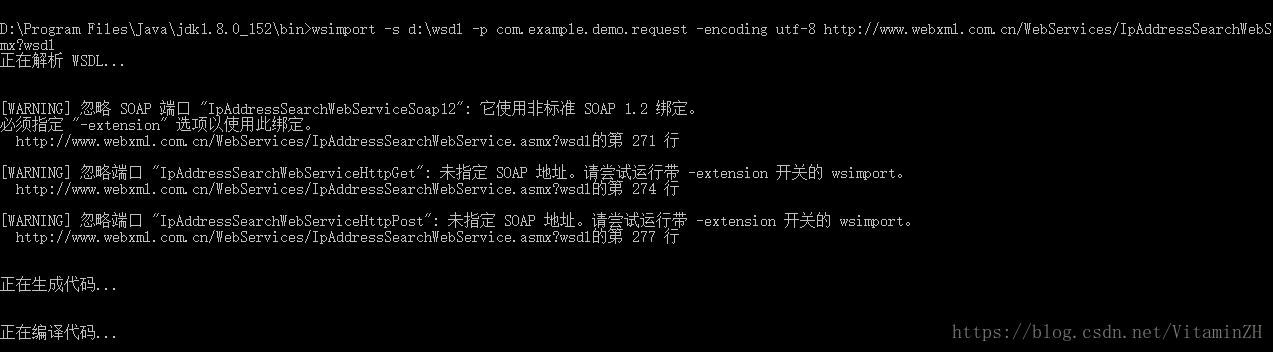
Springboot调用soap webservice(Client)
1.使用jdk自带的webservice工具wsimport生成相关类 测试wsdl http://www.webxml.com.cn/WebServices/IpAddressSearchWebService.asmx?wsdl
|
1 |
wsimport -s d:\wsdl -p com.example.demo.request -encoding utf-8 http://www.webxml.com.cn/WebServices/IpAddressSearchWebService.asmx?wsdl |
-s 存储目录; -p 包名; -encoding 文件编码,默认会采用操作系统编码,中文为gbk,建议使用utf-8; 2.构建相关的配置类及测试方法
|
1 2 3 4 5 6 7 8 |
@Configuration public class IpConfig { @Bean public IpAddressSearchWebServiceSoap webService(){ return new IpAddressSearchWebService().getIpAddressSearchWebServiceSoap(); } } |
|
1 2 3 4 5 6 7 8 9 10 11 12 13 14 15 16 17 18 |
@SpringBootApplication @RestController @RequestMapping("/soap") public class DemoApplication { @Autowired private IpAddressSearchWebServiceSoap soap; public static void main(String[] args) { SpringApplication.run(DemoApplication.class, args); } @RequestMapping("/{ip}") public ArrayOfString searchIp(@PathVariable("ip") String ip) { ArrayOfString response = soap.getCountryCityByIp(ip); return response; } } |
from:https://blog.csdn.net/VitaminZH/article/details/81123571
View Details