Seata 2.0实战
-
前期准备
- 已安装 MySQL
- 已安装 Docker
- 已安装 Nacos
-
安装Seata
为了方便,采用docker部署。国内的小伙伴可以配置以下镜像源:
|
1 2 3 4 5 6 7 8 9 10 11 12 13 14 15 16 17 18 |
{ "builder": { "gc": { "defaultKeepStorage": "20GB", "enabled": true } }, "experimental": false, "features": { "buildkit": true }, "registry-mirrors": [ "https://docker.1ms.run", "https://docker.xuanyuan.me", "https://hub.rat.dev", "https://dockerproxy.com" ] } |
拉取镜像:
|
1 |
docker pull seataio/seata-server:2.0.0 |
拷贝资源文件夹到本机:
|
1 2 3 4 5 6 7 8 |
# 先运行镜像 docker run -d --name seata-server -p 8091:8091 seataio/seata-server:2.0.0 # 拷贝资源文件夹 docker cp seata-server:/seata-server/resources /root/docker/cloud/seata # 删除容器 docker stop seata-server && docker rm seata-server |
修改配置文件:/root/docker/cloud/seata/application.yml
|
1 2 3 4 5 6 7 8 9 10 11 12 13 14 15 16 17 18 19 20 21 22 23 24 25 26 27 28 29 30 31 32 33 34 35 36 37 38 39 40 41 42 43 44 45 46 47 48 49 50 51 52 53 54 55 56 57 58 59 60 61 62 63 64 65 66 67 68 69 70 |
# Copyright 1999-2019 Seata.io Group. # # Licensed under the Apache License, Version 2.0 (the "License"); # you may not use this file except in compliance with the License. # You may obtain a copy of the License at # # http://www.apache.org/licenses/LICENSE-2.0 # # Unless required by applicable law or agreed to in writing, software # distributed under the License is distributed on an "AS IS" BASIS, # WITHOUT WARRANTIES OR CONDITIONS OF ANY KIND, either express or implied. # See the License for the specific language governing permissions and # limitations under the License. server: port: 7091 spring: application: name: seata-server logging: config: classpath:logback-spring.xml file: path: ${log.home:${user.home}/logs/seata} extend: logstash-appender: destination: 127.0.0.1:4560 kafka-appender: bootstrap-servers: 127.0.0.1:9092 topic: logback_to_logstash console: user: username: seata password: seata seata: config: # support: nacos, consul, apollo, zk, etcd3 type: nacos nacos: # 配置nacos地址等信息 server-addr: 0.0.0.0:8848 namespace: seata group: SEATA_GROUP username: user1 password: user1 data-id: seataServer.properties registry: # support: nacos, eureka, redis, zk, consul, etcd3, sofa type: nacos nacos: # seata tc 服务注册到 nacos的服务名称,可以自定义 application: seata-server server-addr: 0.0.0.0:8848 namespace: seata group: SEATA_GROUP username: user1 password: user1 store: # support: file 、 db 、 redis 、 raft mode: db # server: # service-port: 8091 #If not configured, the default is '${server.port} + 1000' security: secretKey: SeataSecretKey0c382ef121d778043159209298fd40bf3850a017 tokenValidityInMilliseconds: 1800000 ignore: urls: /,/**/*.css,/**/*.js,/**/*.html,/**/*.map,/**/*.svg,/**/*.png,/**/*.jpeg,/**/*.ico,/api/v1/auth/login,/metadata/v1/** |
MySQL脚本
|
1 2 3 4 5 6 7 8 9 10 11 12 13 14 15 16 17 18 19 20 21 22 23 24 25 26 27 28 29 30 31 32 33 34 35 36 37 38 39 40 41 42 43 44 45 46 47 48 49 50 51 52 53 54 55 56 57 58 59 60 61 62 63 64 65 66 67 68 69 70 71 72 73 74 |
-- Dumping database structure for seata CREATE DATABASE IF NOT EXISTS `seata` /*!40100 DEFAULT CHARACTER SET utf8mb4 COLLATE utf8mb4_general_ci */; USE `seata`; -- Dumping structure for table seata.branch_table CREATE TABLE IF NOT EXISTS `branch_table` ( `branch_id` bigint(20) NOT NULL, `xid` varchar(128) NOT NULL, `transaction_id` bigint(20) DEFAULT NULL, `resource_group_id` varchar(32) DEFAULT NULL, `resource_id` varchar(256) DEFAULT NULL, `branch_type` varchar(8) DEFAULT NULL, `status` tinyint(4) DEFAULT NULL, `client_id` varchar(64) DEFAULT NULL, `application_data` varchar(2000) DEFAULT NULL, `gmt_create` datetime(6) DEFAULT NULL, `gmt_modified` datetime(6) DEFAULT NULL, PRIMARY KEY (`branch_id`), KEY `idx_xid` (`xid`) ) ENGINE=InnoDB DEFAULT CHARSET=utf8mb4 COLLATE=utf8mb4_0900_ai_ci; -- Dumping structure for table seata.distributed_lock CREATE TABLE IF NOT EXISTS `distributed_lock` ( `lock_key` char(20) NOT NULL, `lock_value` varchar(20) NOT NULL, `expire` bigint(20) DEFAULT NULL, PRIMARY KEY (`lock_key`) ) ENGINE=InnoDB DEFAULT CHARSET=utf8mb4 COLLATE=utf8mb4_0900_ai_ci; -- Dumping data for table seata.distributed_lock: ~5 rows (approximately) INSERT INTO `distributed_lock` (`lock_key`, `lock_value`, `expire`) VALUES ('AsyncCommitting', ' ', 0), ('RetryCommitting', ' ', 0), ('RetryRollbacking', ' ', 0), ('TxTimeoutCheck', ' ', 0), ('UndologDelete', ' ', 0); -- Dumping structure for table seata.global_table CREATE TABLE IF NOT EXISTS `global_table` ( `xid` varchar(128) NOT NULL, `transaction_id` bigint(20) DEFAULT NULL, `status` tinyint(4) NOT NULL, `application_id` varchar(32) DEFAULT NULL, `transaction_service_group` varchar(32) DEFAULT NULL, `transaction_name` varchar(128) DEFAULT NULL, `timeout` int(11) DEFAULT NULL, `begin_time` bigint(20) DEFAULT NULL, `application_data` varchar(2000) DEFAULT NULL, `gmt_create` datetime DEFAULT NULL, `gmt_modified` datetime DEFAULT NULL, PRIMARY KEY (`xid`), KEY `idx_status_gmt_modified` (`status`,`gmt_modified`), KEY `idx_transaction_id` (`transaction_id`) ) ENGINE=InnoDB DEFAULT CHARSET=utf8mb4 COLLATE=utf8mb4_0900_ai_ci; -- Dumping structure for table seata.lock_table CREATE TABLE IF NOT EXISTS `lock_table` ( `row_key` varchar(128) NOT NULL, `xid` varchar(128) DEFAULT NULL, `transaction_id` bigint(20) DEFAULT NULL, `branch_id` bigint(20) NOT NULL, `resource_id` varchar(256) DEFAULT NULL, `table_name` varchar(32) DEFAULT NULL, `pk` varchar(36) DEFAULT NULL, `status` tinyint(4) NOT NULL DEFAULT 0 COMMENT '0:locked ,1:rollbacking', `gmt_create` datetime DEFAULT NULL, `gmt_modified` datetime DEFAULT NULL, PRIMARY KEY (`row_key`), KEY `idx_status` (`status`), KEY `idx_branch_id` (`branch_id`), KEY `idx_xid` (`xid`) ) ENGINE=InnoDB DEFAULT CHARSET=utf8mb4 COLLATE=utf8mb4_0900_ai_ci; |
配置Nacos
创建命名空间:
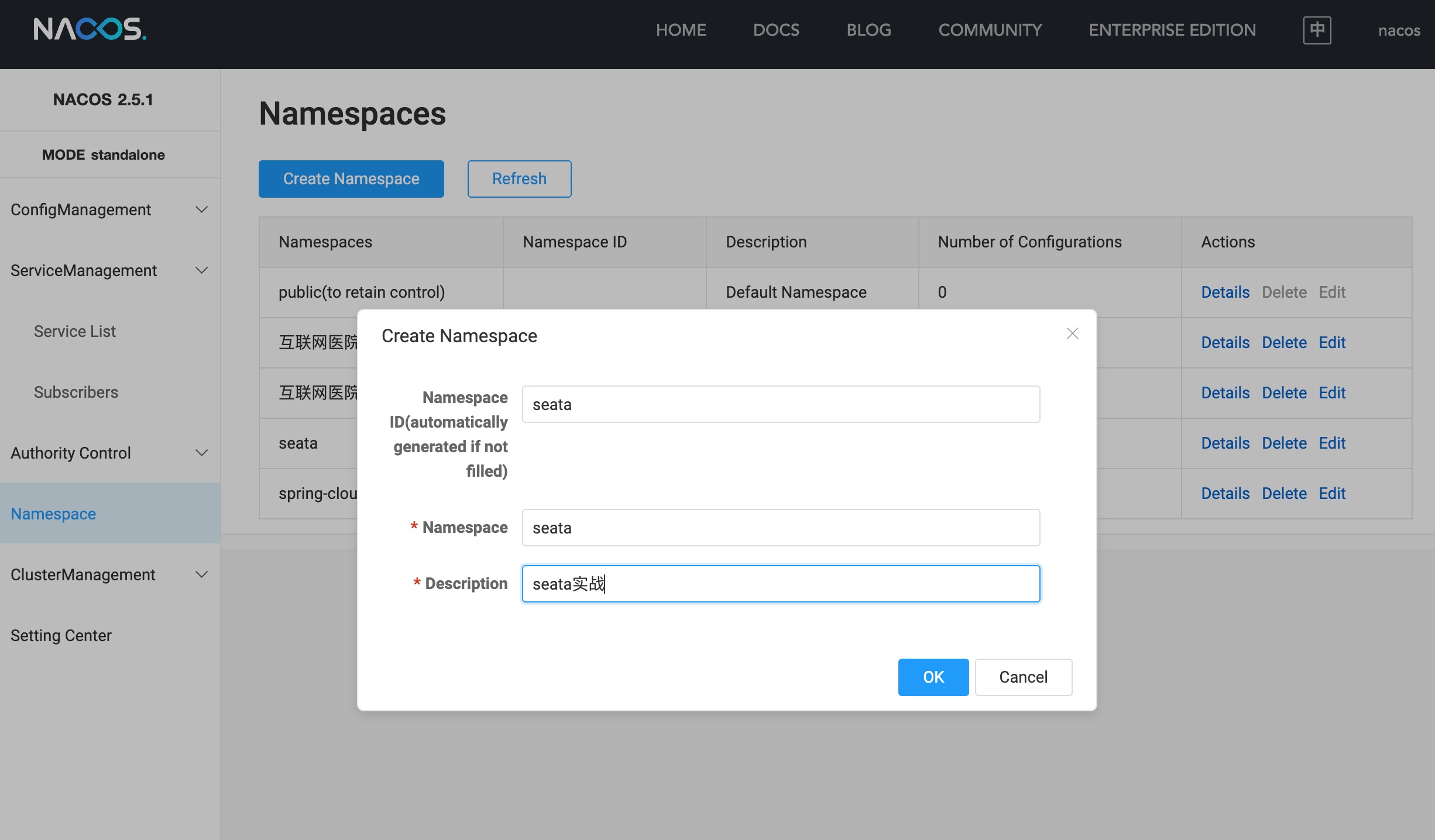
在seata命名空间下新增配置:
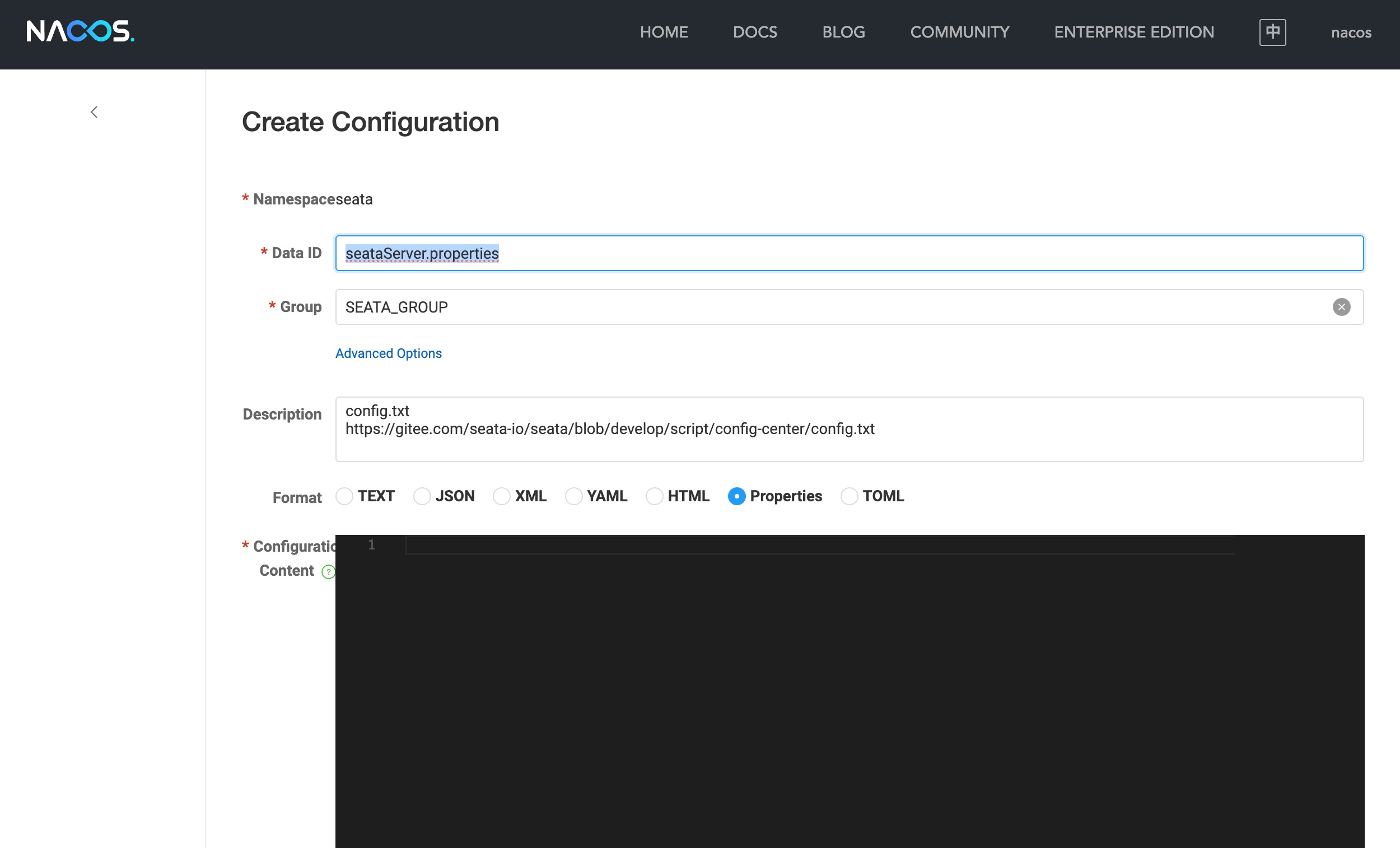
|
1 2 3 4 5 6 7 8 9 10 11 12 13 14 15 16 17 18 19 20 21 22 23 24 25 26 27 28 29 30 31 32 33 34 35 36 37 38 39 40 41 42 43 44 45 46 47 48 49 50 51 52 53 54 55 56 57 58 59 60 61 62 63 64 65 66 67 68 69 70 71 72 73 74 75 76 77 78 79 80 81 82 83 84 85 86 87 88 89 90 91 92 93 94 95 96 97 98 99 100 101 102 103 104 105 106 107 108 109 110 111 112 113 114 115 116 117 118 119 120 121 122 123 124 125 126 127 128 129 130 131 132 |
#For details about configuration items, see https://seata.io/zh-cn/docs/user/configurations.html #Transport configuration, for client and server transport.type=TCP transport.server=NIO transport.heartbeat=true transport.enableTmClientBatchSendRequest=false transport.enableRmClientBatchSendRequest=true transport.enableTcServerBatchSendResponse=false transport.rpcRmRequestTimeout=30000 transport.rpcTmRequestTimeout=30000 transport.rpcTcRequestTimeout=30000 transport.threadFactory.bossThreadPrefix=NettyBoss transport.threadFactory.workerThreadPrefix=NettyServerNIOWorker transport.threadFactory.serverExecutorThreadPrefix=NettyServerBizHandler transport.threadFactory.shareBossWorker=false transport.threadFactory.clientSelectorThreadPrefix=NettyClientSelector transport.threadFactory.clientSelectorThreadSize=1 transport.threadFactory.clientWorkerThreadPrefix=NettyClientWorkerThread transport.threadFactory.bossThreadSize=1 transport.threadFactory.workerThreadSize=default transport.shutdown.wait=3 transport.serialization=seata transport.compressor=none #Transaction routing rules configuration, only for the client service.vgroupMapping.default=default service.vgroupMapping.default_tx_group=default #If you use a registry, you can ignore it service.default.grouplist=127.0.0.1:8091 service.enableDegrade=false service.disableGlobalTransaction=false #Transaction rule configuration, only for the client client.rm.asyncCommitBufferLimit=10000 client.rm.lock.retryInterval=10 client.rm.lock.retryTimes=30 client.rm.lock.retryPolicyBranchRollbackOnConflict=true client.rm.reportRetryCount=5 client.rm.tableMetaCheckEnable=true client.rm.tableMetaCheckerInterval=60000 client.rm.sqlParserType=druid client.rm.reportSuccessEnable=false client.rm.sagaBranchRegisterEnable=false client.rm.sagaJsonParser=fastjson client.rm.tccActionInterceptorOrder=-2147482648 client.tm.commitRetryCount=5 client.tm.rollbackRetryCount=5 client.tm.defaultGlobalTransactionTimeout=60000 client.tm.degradeCheck=false client.tm.degradeCheckAllowTimes=10 client.tm.degradeCheckPeriod=2000 client.tm.interceptorOrder=-2147482648 client.undo.dataValidation=true client.undo.logSerialization=jackson client.undo.onlyCareUpdateColumns=true server.undo.logSaveDays=7 server.undo.logDeletePeriod=86400000 client.undo.logTable=undo_log client.undo.compress.enable=true client.undo.compress.type=zip client.undo.compress.threshold=64k #For TCC transaction mode tcc.fence.logTableName=tcc_fence_log tcc.fence.cleanPeriod=1h #Log rule configuration, for client and server log.exceptionRate=100 #Transaction storage configuration, only for the server. The file, db, and redis configuration values are optional. store.mode=db store.lock.mode=db store.session.mode=db #Used for password encryption store.publicKey= #If `store.mode,store.lock.mode,store.session.mode` are not equal to `file`, you can remove the configuration block. store.file.dir=file_store/data store.file.maxBranchSessionSize=16384 store.file.maxGlobalSessionSize=512 store.file.fileWriteBufferCacheSize=16384 store.file.flushDiskMode=async store.file.sessionReloadReadSize=100 #These configurations are required if the `store mode` is `db`. If `store.mode,store.lock.mode,store.session.mode` are not equal to `db`, you can remove the configuration block. store.db.datasource=druid store.db.dbType=mysql store.db.driverClassName=com.mysql.cj.jdbc.Driver store.db.url=jdbc:mysql://0.0.0.0:3306/seata?useUnicode=true&serverTimezone=Asia/Shanghai&useSSL=false store.db.user=root store.db.password=root store.db.minConn=5 store.db.maxConn=30 store.db.globalTable=global_table store.db.branchTable=branch_table store.db.distributedLockTable=distributed_lock store.db.queryLimit=100 store.db.lockTable=lock_table store.db.maxWait=5000 #These configurations are required if the `store mode` is `redis`. If `store.mode,store.lock.mode,store.session.mode` are not equal to `redis`, you can remove the configuration block. store.redis.mode=single store.redis.single.host=0.0.0.0 store.redis.single.port=6379 store.redis.sentinel.masterName= store.redis.sentinel.sentinelHosts= store.redis.sentinel.sentinelPassword= store.redis.maxConn=10 store.redis.minConn=1 store.redis.maxTotal=100 store.redis.database=10 store.redis.password=password store.redis.queryLimit=100 #Transaction rule configuration, only for the server server.recovery.committingRetryPeriod=1000 server.recovery.asynCommittingRetryPeriod=1000 server.recovery.rollbackingRetryPeriod=1000 server.recovery.timeoutRetryPeriod=1000 server.maxCommitRetryTimeout=-1 server.maxRollbackRetryTimeout=-1 server.rollbackFailedUnlockEnable=false server.distributedLockExpireTime=10000 server.xaerNotaRetryTimeout=60000 server.session.branchAsyncQueueSize=5000 server.session.enableBranchAsyncRemove=false server.enableParallelRequestHandle=false #Metrics configuration, only for the server metrics.enabled=false metrics.registryType=compact metrics.exporterList=prometheus metrics.exporterPrometheusPort=9898 |
启动容器
|
1 2 3 4 5 6 7 8 9 10 11 12 13 14 |
docker run \ --name seata-server -d \ --restart=always \ -p 8091:8091 \ -p 7091:7091 \ -e SEATA_PORT=8091 \ -e SEATA_IP=1xx.14.1xx.1x \ -e JVM_XMX=256m \ -e JVM_XMS=256m \ -e JVM_XSS=256m \ -v /root/docker/cloud/seata:/seata-server/resources \ seataio/seata-server:2.0.0 # SEATA_IP需要填写局域网IP或公网IP |
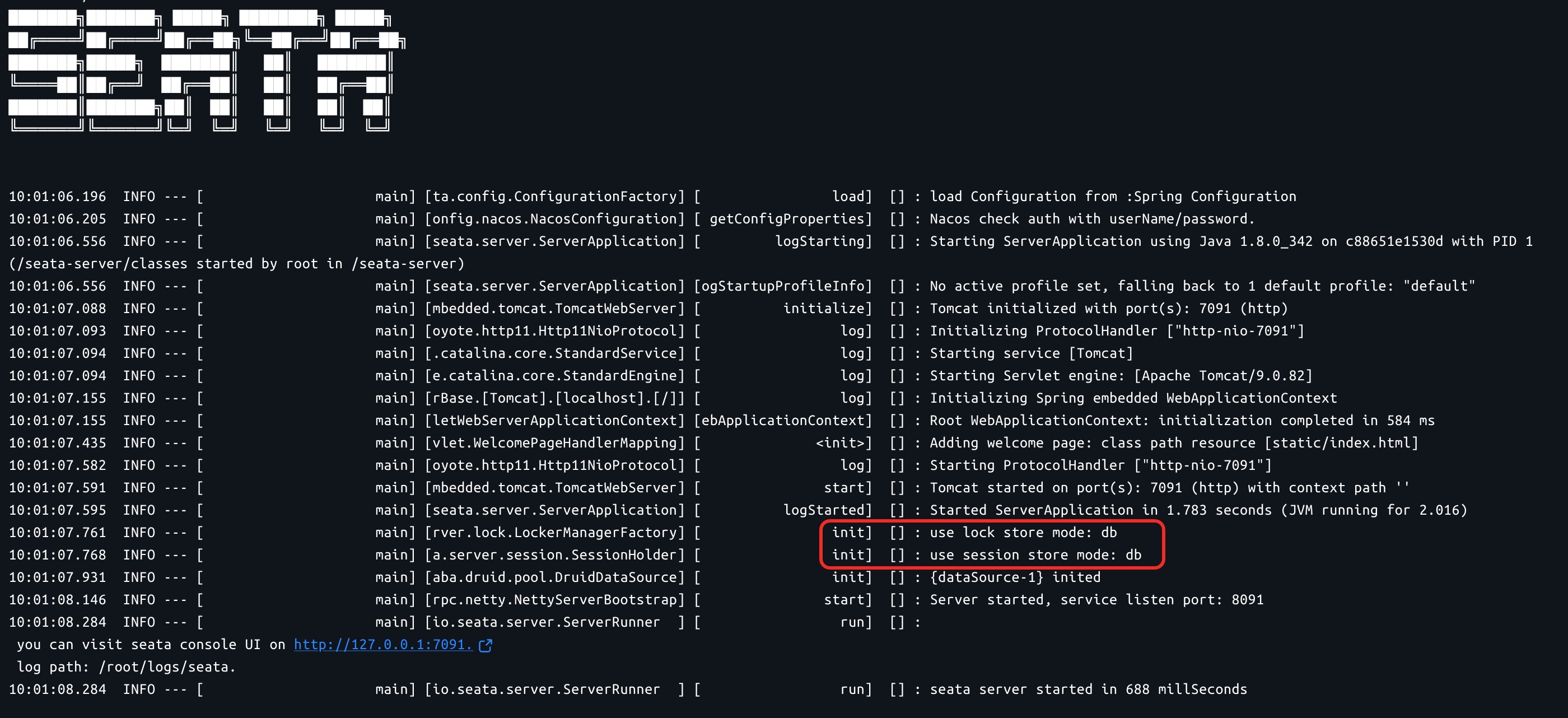
查看docker日志,看到以下信息,说明seata部署成功了。
-
集成Seata
此示例模拟订单服务内部调用库存服务完成下单过程。
项目结构
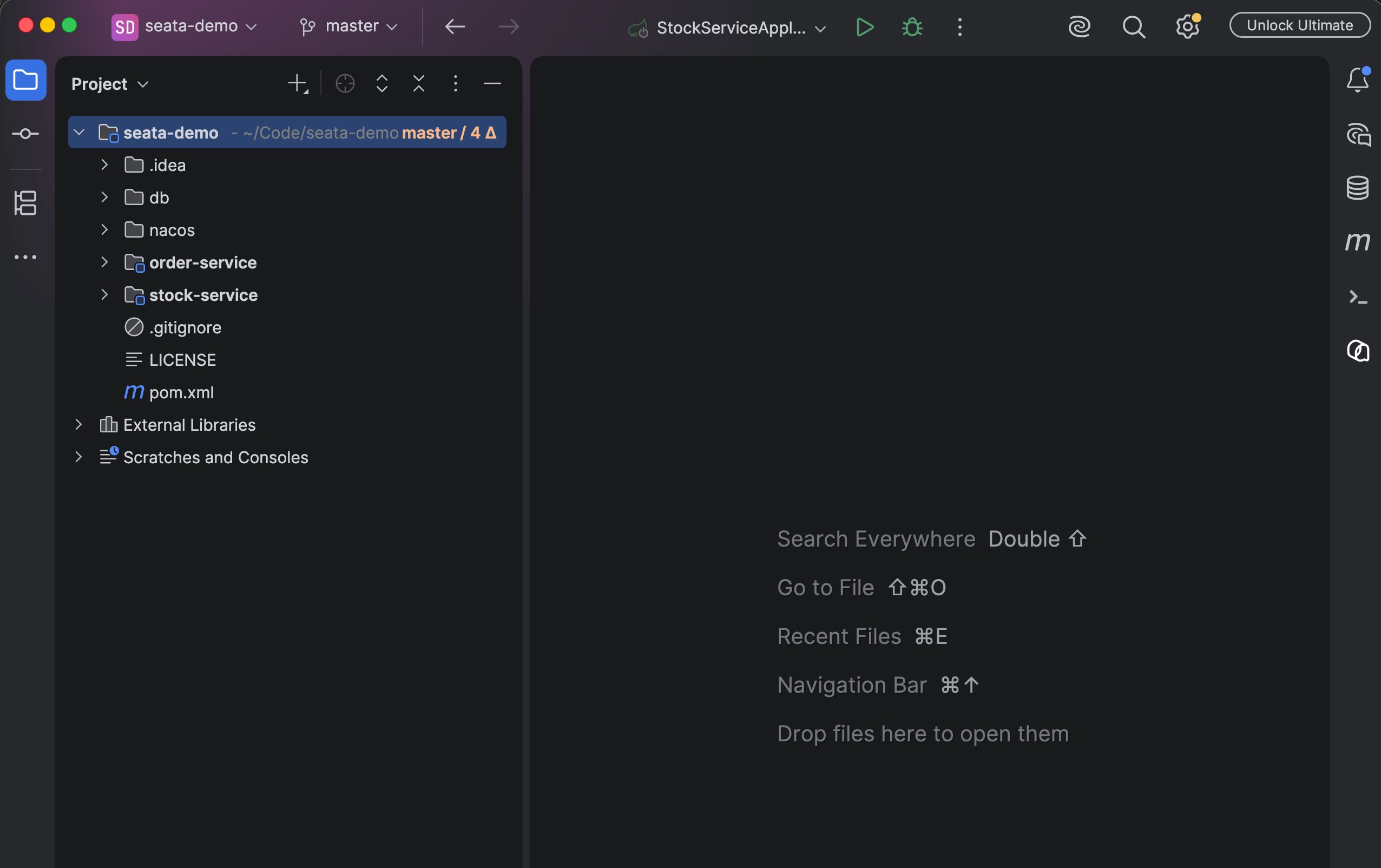
MySQL脚本
|
1 2 3 4 5 6 7 8 9 10 11 12 13 14 15 16 17 18 19 20 21 22 23 24 25 26 27 28 29 |
-- Dumping database structure for seata_order CREATE DATABASE IF NOT EXISTS `seata_order` /*!40100 DEFAULT CHARACTER SET utf8mb4 COLLATE utf8mb4_general_ci */; USE `seata_order`; -- Dumping structure for table seata_order.order CREATE TABLE IF NOT EXISTS `order` ( `id` int(11) NOT NULL AUTO_INCREMENT, `user_id` bigint(20) DEFAULT 0, `product_id` bigint(20) DEFAULT 0, `count` int(11) DEFAULT 0, `status` tinyint(4) DEFAULT 0, `create_time` datetime DEFAULT curtime(), PRIMARY KEY (`id`) ) ENGINE=InnoDB AUTO_INCREMENT=44 DEFAULT CHARSET=utf8mb4 COLLATE=utf8mb4_general_ci; -- seata回滚用的表 CREATE TABLE IF NOT EXISTS `undo_log` ( `id` bigint(20) NOT NULL AUTO_INCREMENT, `branch_id` bigint(20) NOT NULL, `xid` varchar(100) NOT NULL, `context` varchar(128) NOT NULL, `rollback_info` longblob NOT NULL, `log_status` int(11) NOT NULL, `log_created` datetime NOT NULL, `log_modified` datetime NOT NULL, `ext` varchar(100) DEFAULT NULL, PRIMARY KEY (`id`), UNIQUE KEY `ux_undo_log` (`xid`,`branch_id`) ) ENGINE=InnoDB AUTO_INCREMENT=44 DEFAULT CHARSET=utf8mb4 COLLATE=utf8mb4_uca1400_ai_ci; |
|
1 2 3 4 5 6 7 8 9 10 11 12 13 14 15 16 17 18 19 20 21 22 23 24 25 26 27 28 29 30 31 |
-- Dumping database structure for seata_stock CREATE DATABASE IF NOT EXISTS `seata_stock` /*!40100 DEFAULT CHARACTER SET utf8mb4 COLLATE utf8mb4_general_ci */; USE `seata_stock`; -- Dumping structure for table seata_stock.stock CREATE TABLE IF NOT EXISTS `stock` ( `id` bigint(20) NOT NULL AUTO_INCREMENT, `product_id` bigint(20) DEFAULT 0, `count` bigint(20) DEFAULT 0, `update_time` datetime DEFAULT NULL ON UPDATE current_timestamp(), PRIMARY KEY (`id`) ) ENGINE=InnoDB AUTO_INCREMENT=2 DEFAULT CHARSET=utf8mb4 COLLATE=utf8mb4_general_ci; -- Dumping data for table seata_stock.stock: ~1 rows (approximately) INSERT INTO `stock` (`id`, `product_id`, `count`, `update_time`) VALUES (1, 1, 86, '2026-08-06 17:23:12'); -- seata回滚用的表 CREATE TABLE IF NOT EXISTS `undo_log` ( `id` bigint(20) NOT NULL AUTO_INCREMENT, `branch_id` bigint(20) NOT NULL, `xid` varchar(100) NOT NULL, `context` varchar(128) NOT NULL, `rollback_info` longblob NOT NULL, `log_status` int(11) NOT NULL, `log_created` datetime NOT NULL, `log_modified` datetime NOT NULL, `ext` varchar(100) DEFAULT NULL, PRIMARY KEY (`id`), UNIQUE KEY `ux_undo_log` (`xid`,`branch_id`) ) ENGINE=InnoDB DEFAULT CHARSET=utf8mb4 COLLATE=utf8mb4_uca1400_ai_ci; |
引入依赖
|
1 2 3 4 5 |
<dependency> <groupId>io.seata</groupId> <artifactId>seata-spring-boot-starter</artifactId> <version>${seata.version}</version> </dependency> |
配置文件application.yaml
|
1 2 3 4 5 6 7 8 9 10 11 12 13 14 15 16 17 18 19 20 21 22 23 24 25 26 27 28 29 30 31 32 33 34 35 36 37 38 39 40 41 |
server: port: 8888 spring: application: name: order-service datasource: driver-class-name: com.mysql.cj.jdbc.Driver url: jdbc:mysql://127.0.0.1:3306/seata_order?useUnicode=true&serverTimezone=Asia/Shanghai&useSSL=false username: root password: root cloud: nacos: server-addr: 0.0.0.0:8848 username: user1 password: user1 discovery: namespace: "seata" group: SEATA_GROUP seata: enabled: true application-id: ${spring.application.name} tx-service-group: default data-source-proxy-mode: AT service: vgroupMapping: default: default seata-validate-demo-group: default registry: type: nacos nacos: application: seata-server server-addr: 0.0.0.0:8848 group: SEATA_GROUP namespace: "seata" username: user1 password: user1 cluster: default |
order-service核心代码:
@GlobalTransactional(rollbackFor = Exception.class)加在需要全局事务的方法上。
|
1 2 3 4 5 6 7 8 9 10 11 12 13 14 15 16 17 18 19 20 21 22 23 24 25 26 27 28 29 30 31 32 33 34 35 36 |
package com.example.seata.order.service; import com.example.seata.order.domain.Order; import com.example.seata.order.mapper.OrderMapper; import io.seata.spring.annotation.GlobalTransactional; import org.springframework.beans.factory.annotation.Autowired; import org.springframework.stereotype.Service; import org.springframework.web.client.RestTemplate; import javax.annotation.Resource; @Service public class OrderService { @Autowired private OrderMapper orderMapper; @Resource private RestTemplate restTemplate; // 全局事务注解:加在TM的方法上! @GlobalTransactional(rollbackFor = Exception.class) public int createOrder(Long userId, Long productId, Integer count) { // 1. 本地事务:创建订单 Order order = new Order(); order.setUserId(userId); order.setProductId(productId); order.setCount(count); order.setStatus(0); // 0:待支付 orderMapper.insert(order.getUserId(), order.getProductId(), order.getCount(), order.getStatus()); System.out.println("订单创建成功:" + order.getId()); // 2. 远程调用:扣减库存(调用库存服务) String url = "http://stock-service/deduct?productId=" + productId + "&count=" + count; restTemplate.postForObject(url, null, String.class); return 0; } } |
stock-service核心代码:
本地事务:不用加@GlobalTransactional,Seata自动拦截
|
1 2 3 4 5 6 7 8 9 10 11 12 13 14 15 16 17 18 19 20 21 22 23 |
package com.example.seata.stock.service; import com.example.seata.stock.mapper.StockMapper; import org.springframework.beans.factory.annotation.Autowired; import org.springframework.stereotype.Service; @Service public class StockService { @Autowired private StockMapper stockMapper; // 本地事务:不用加@GlobalTransactional,Seata自动拦截 public int deduct(Long productId, Long count) { // 扣减库存 int rows = stockMapper.deductStock(productId, count); if (rows == 0) { throw new RuntimeException("库存不足!"); } System.out.println("库存扣减成功:商品ID=" + productId); return rows; } } |
完整代码请移步:https://gitee.com/w3cnet/seata-demo
参考资料:
https://juejin.cn/post/7542422399083708454
https://blog.csdn.net/zhuocailing3390/article/details/136999236
https://juejin.cn/post/7468950874322698274